Storing geodata in neural networks
Chapter 9 · Measuring compression ratio and error
Deutsche Fassung · Translated from the German original.

Contents:
- Why a single number is not enough to judge a compression method
- How to create and read a rate-distortion curve
- What PSNR means
This chapter extends chapters 1 to 5 and uses the context field from chapter 8. You can also skip it.
Starting point
In the previous chapters, each network came with a compression ratio and an error. The standard example, for instance, is 14 times smaller than the grid and is off by around 250 m on average.
Whether that is good cannot be said this way. A larger neural network would be more accurate, but the file would be larger. A smaller network saves more but makes larger errors. Every compression is a trade-off between these two goals.
An honest comparison therefore shows not a single point but a whole curve.
Two numbers for each network
For each network there are two key figures, both already familiar:
- Rate: the compression ratio from chapter 1 – raw size of the grid divided by the size of the file. Higher means: smaller file.
- Error: the area-weighted RMSE from chapter 2 – by how many metres the network is off on average, with the polar regions weighted by their true area. Lower means: more accurate.
In technical language, the error in compression is called distortion. The curve that plots the two numbers against each other is therefore called the rate-distortion curve. The term comes from Claude Shannon's information theory [1].
Creating the curve
For the curve you train several networks that differ in only one property: the number of neurons per layer, the network width. Everything else stays the same – the same grid, the same number of training steps, the same encoding. Each network gives one point: right or left depending on the file size, up or down depending on the error. Connecting the points gives the curve.
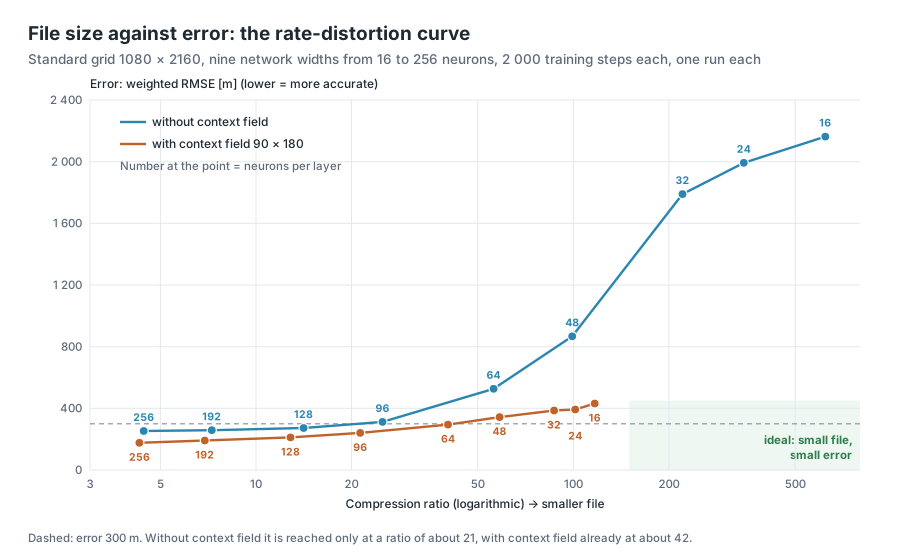
The diagram shows this for the standard grid 1080 × 2160 with nine network widths from 16 to 256 neurons, once without and once with the context field from chapter 8:
The numbers:
| Neurons per layer | without context field: file | Rate | Error | with context field: file | Rate | Error |
|---|---|---|---|---|---|---|
| 16 | 7 KB | 622 | 2 163 m | 39 KB | 117 | 431 m |
| 24 | 13 KB | 344 | 1 993 m | 45 KB | 101 | 393 m |
| 32 | 21 KB | 221 | 1 790 m | 52 KB | 87 | 386 m |
| 48 | 46 KB | 99 | 867 m | 78 KB | 59 | 343 m |
| 64 | 81 KB | 56 | 527 m | 113 KB | 40 | 294 m |
| 96 | 182 KB | 25 | 312 m | 214 KB | 21 | 240 m |
| 128 | 323 KB | 14 | 272 m | 355 KB | 13 | 211 m |
| 192 | 628 KB | 7.3 | 258 m | 660 KB | 6.9 | 191 m |
| 256 | 1 029 KB | 4.4 | 253 m | 1 062 KB | 4.3 | 176 m |
All networks have 4 hidden layers and Fourier features with σ = 8 and were trained for 2 000 steps, each once. The error is measured on a fixed sample of 200 000 grid cells. The values vary a little from run to run.
The network with 128 neurons has exactly as many weights as the standard example (82 561). But it was trained for only 2 000 instead of 4 000 steps and has σ = 8 instead of 6, which is why its error is a little higher.
Reading the curve
Bottom right would be ideal. There the file would be small and the error low. No method gets there, but the closer a curve comes to this corner, the better the method.
The logarithmic axis. The compression ratio ranges from 4 to over 600. So that the points are not all crowded together on the left, the axis grows in factors: from 10 to 100 is just as far as from 100 to 1 000.
A curve below another is better. The orange curve with context field lies below the blue one everywhere. At every file size, the network with context field is more accurate. An example: the network without context field with 64 neurons (81 KB, 527 m) and the network with context field with 48 neurons (78 KB, 343 m) are almost the same size, but the second is off by almost 200 m less.
A network that is worse than another in both numbers is not needed. What remains are only the networks for which you have to accept a larger file for more accuracy. In technical language this lower edge of all points is called the Pareto front.
Reading horizontally: what does a certain error cost? The dashed line lies at 300 m. Without context field you reach this error only at a ratio of about 21, with context field already at about 42. For the same accuracy, the file with context field is thus only half as large.
Reading vertically: what does a certain file size buy? At a ratio of 14, i.e. around 330 KB, the network without context field is off by 272 m, with context field (ratio 13) by 211 m.
What the curve reveals
The kink upwards. Without context field the error grows quickly to the right of a ratio of about 50. The network with 32 neurons is off by almost 1 800 m, its R² (chapter 2) is only 0.53: it reproduces barely more than half of the elevation differences. Networks this small have too few weights for the position of continents and ocean basins. That is exactly what the context field provides ready-made. That is why the orange curve stays flat even for small networks.
The context field has a minimum price. The orange curve ends at a ratio of 117. The context field alone takes up 31.6 KB; no file with context field gets smaller than that, however small the network.
It flattens out on the left. Without context field, doubling from 323 KB to 628 KB brings only 14 m, the next doubling 5 m. More weights hardly help the network here. With context field, on the other hand, the error keeps getting smaller up to the largest network.
The curve only holds for its settings. With the app's default settings, 600 instead of 2 000 steps, the blue curve lies considerably higher: 346 m instead of 272 m for the network with 128 neurons, 847 m instead of 527 m for the network with 64 neurons. σ, the number of layers and the grid also change the curve. Anyone comparing two methods should therefore train both for the same time and state the settings with which the curve was produced.
PSNR: the error relative to the range
Below the curve, the app shows a second number next to the error in metres: PSNR (peak signal-to-noise ratio) [2]. It comes from image and video compression and says how large the error is compared with the whole range of the data.
The range is the distance between the lowest and the highest value. In the standard grid it goes from −10 082 m to 6 259 m, a good 16 000 m. (Mount Everest does not reach 8 849 m here, because each cell is the mean of a block of 10 × 10 original cells.)
The unit dB is called decibel. A worked example with round numbers: if the network is off by 160 m on average with a range of 16 000 m, the error is one hundredth of the range. The logarithm of 100 is 2, times 20 gives 40 dB.
Two rules of thumb are enough for reading it:
- +6 dB means: the error is only half as large.
- +20 dB means: the error is only a tenth as large.
Higher is therefore better. In the diagram above, PSNR ranges from 17 dB for the smallest network without context field to 39 dB for the largest network with context field.
The advantage of PSNR: you can compare datasets with completely different units, such as elevations in metres and temperatures in degrees. The disadvantage: PSNR uses the plain RMSE without weighting by area, and a single outlier in the Mariana Trench changes the range. For the Earth, the weighted RMSE in metres therefore remains the more important measure; PSNR is a supplement for comparisons with other work.
Research compares the same way
Huang and Hoefler, the model for this tutorial series, also judge their method by both numbers: at compression ratios from 300 to over 3 000 they measure the weighted RMSE and the MAE and compare with the classical compression program SZ3. According to their results, their network is more accurate than SZ3 [3]. Anyone who wants to compare their own results with the literature therefore always needs both numbers: rate and error.
Try it out
In the sidebar under 1 · Data, choose the resolution. The curve uses this grid. The preset under 2 · Network, on the other hand, plays no role: the curve uses its own settings with 4 layers and σ = 8.
Open the Rate & Error tab. Three things can be set there:
- Steps per network – training steps for each network, 300 to 2 000 (default 600).
- Network widths – the network widths that enter the curve as points, from 16 to 256 neurons (default 16, 32, 64 and 128).
- Also with context field (90 × 180) – additionally a second curve with context field.
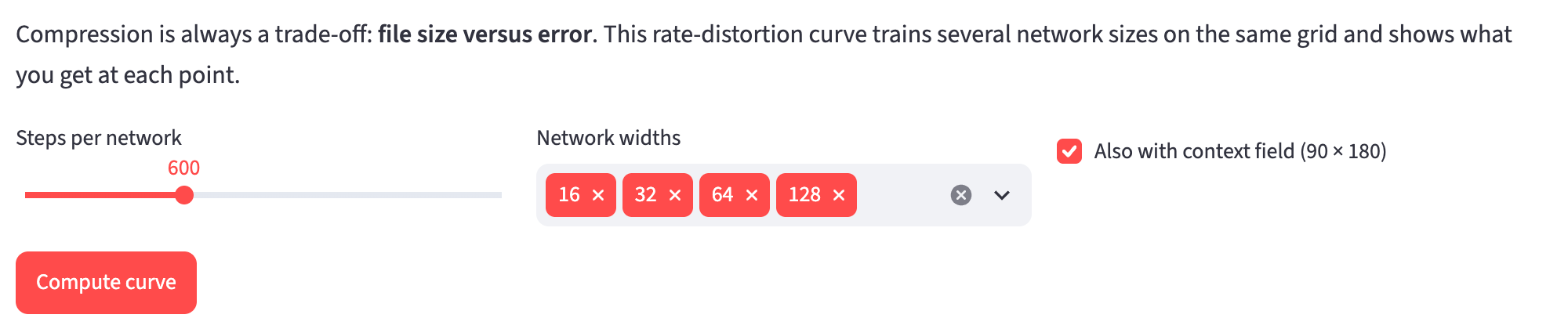
Click Compute curve. The app now trains one network after the other; a bar shows the progress. With the default settings there are eight networks. On a Mac with an Apple graphics chip this takes a little over a minute, without a graphics chip considerably longer.
Then look at the curve. The number at each point is the network width.
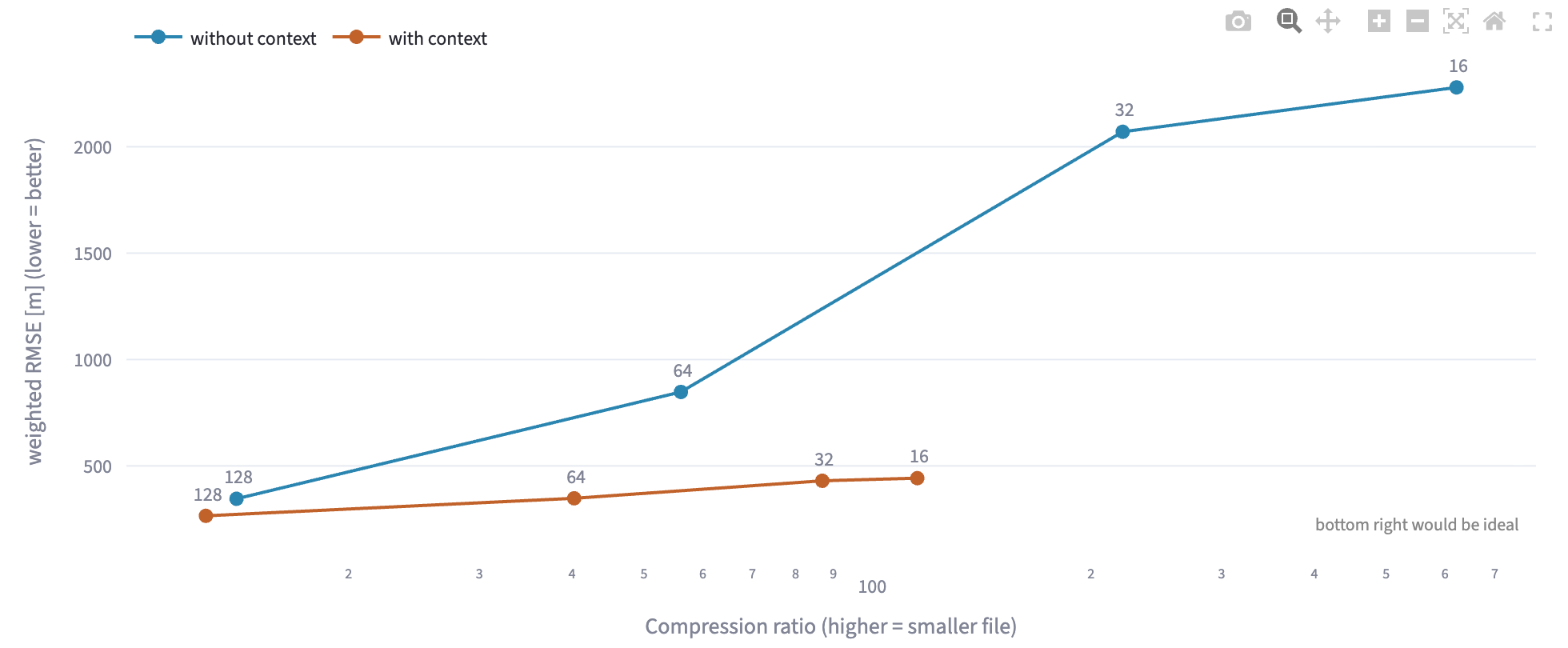
Below the curve is a table with parameters, file size, rate, weighted RMSE and PSNR for each network.
Ideas to explore further
- Which rate do you reach at an error of 250 m – with and without context field? Add the widths 96, 128 and 192 and read off horizontally.
- Set Steps per network to 2 000 and recompute the curve. Which points move down the most, the small or the large networks?
- Compute the curve on the grid 360 × 720. The grid is nine times smaller, the networks stay the same size. Where does the curve shift?
- Mentally enter the presets from chapter 8 as single points in the diagram: Fourier MLP, very small with 75 KB and 339 m after 4 000 steps. Does this point lie above or below the blue curve – and what could be the reason?
- From which network width is the PSNR above 35 dB?
Further reading
- [1] Wikipedia: Rate–distortion theory – the theoretical foundation: how small a file can be at most for a permitted error
- [2] Wikipedia: Peak signal-to-noise ratio – definition and examples from image compression
- [3] Huang and Hoefler: Compressing multidimensional weather and climate data into neural networks, ICLR 2023 – comparison with SZ3 via weighted RMSE and MAE at compression ratios from 300 to over 3 000
Overview · Back: Chapter 8 · The context field · Next: Chapter 10 · Querying and exporting
This tutorial was created by Gerhard Völkl using Claude Code (Anthropic). It is meant to help you learn more about storing geodata in neural networks. Suggestions for improvement are welcome at gkvoelkl@nelson-games.de.